How to clear iPads Safari browser cache
admin admin
Posted at January 08, 2020 02:01 pm. Last updated at January 08, 2020 02:01 pm
Before doing this make sure that you are authorized by any of the IT Personnel or any Office-in-charge as this would affect the drivers use of the iPad.
If you are authorized, we can now proceed.
Step 1: Launch the "Settings" app on your iPad through the home screen.
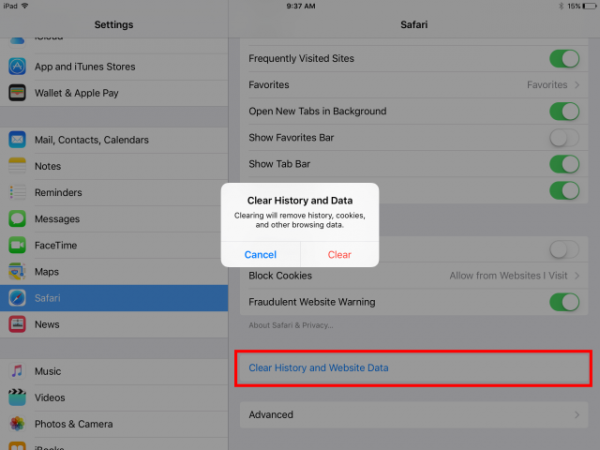
Step 2: Scroll down the menu and select "Safari".
Step 3: Scroll down to the bottom of right hand panel and tap on "Clear History and Website Data".
Step 4: Confirm by tapping "Clear" from the pop-up window..
Comments