Linux VM's Wired Connection Doesn't Appears
Emerson Tiamzon
Posted at June 29, 2023 10:06 am. Last updated at June 29, 2023 11:06 am
Linux VM's Wired Connection Doesn't Appears
If VM disconnects from the internet even after restart.
Here the following procedures:
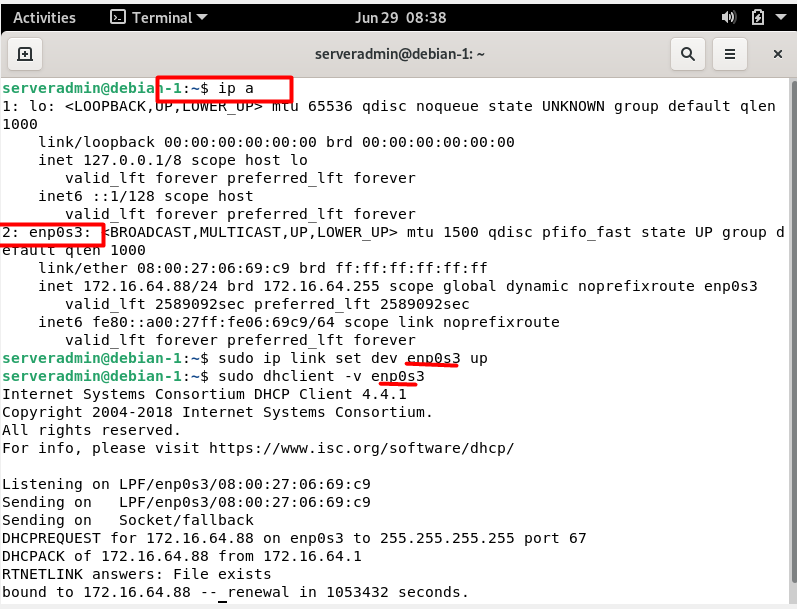
- Run "ip a" command
- Get the network interface enp0s3 (others are eth0,ens192)
- Enable Network Interface run command "sudo ip link set dev enp0s3 up"
- Show dhclient info of enp0s3 run command "sudo dhclient -v enp0s3"
- Restart Network Manager run following command
- sudo service network-manager restart
- sudo systemctl restart network-manager
- Alternative command if the network-manager not works
- sudo service network-manager restart
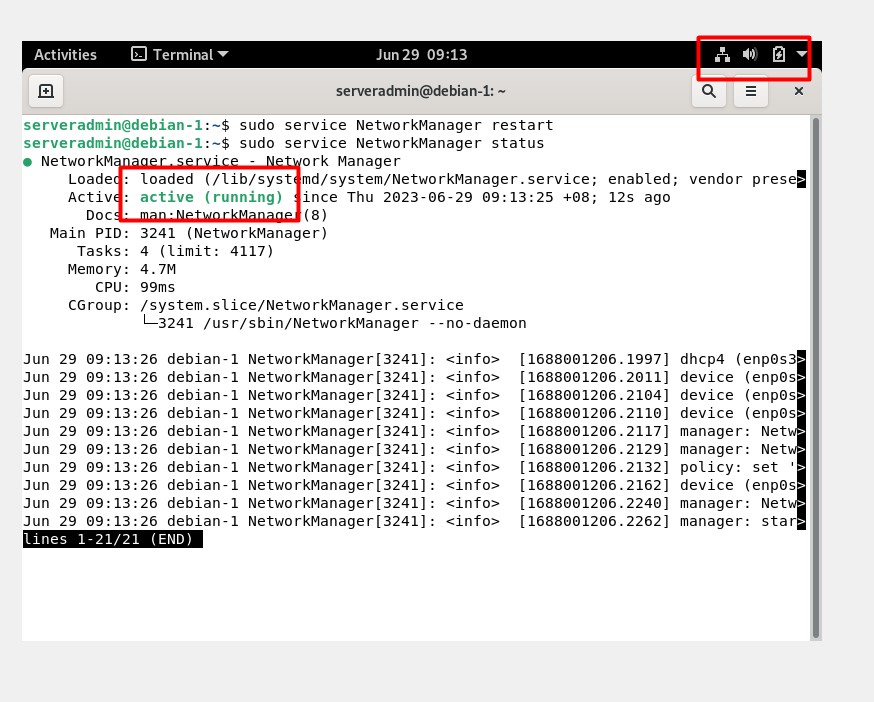
- sudo systemctl restart NetworkManager
- Check Status Network Manager run following command
- sudo service network-manager status
- sudo systemctl status network-manager
- Alternative command if the network-manager not works
- sudo service network-manager status
- sudo systemctl status NetworkManager
References
ipcommand here
dhclient info here
restart network interface link1 link2
Comments