MYOB Restart Windows Services
Emerson Tiamzon
Posted at July 14, 2023 04:07 pm. Last updated at February 10, 2025 12:02 pm
These are the services that are conneted to MYOB please make sure all these are running. Refresh the services to double check the services. Please ignore the disabled services they are the old versions of MYOB.

1. Manual enable and disable the services.
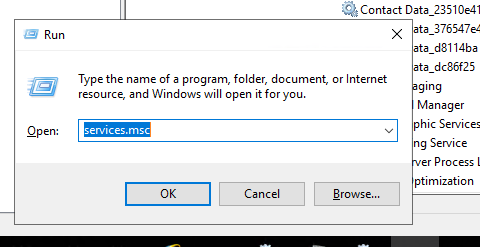
- Press windows key + r then type services.msc
- Disabled the old version running eg name: MYOB AccountRight Server YYYY.M (2023.6)
- Right click "Properties"
- Change "Startup Type" to "Disable"
- Click the "Stop" button on "Service Status"
- Click Apply
- Stop start the following services:
- MYOB AccountRight Library
- MYOB AccountRight API Service
- MYOB AccountRight Server Locator
2. Update the bat file. (C:\Scripts\RestartMYOBServices.bat) (AWMAdmin user)
- Change the version value and get the name from the Services
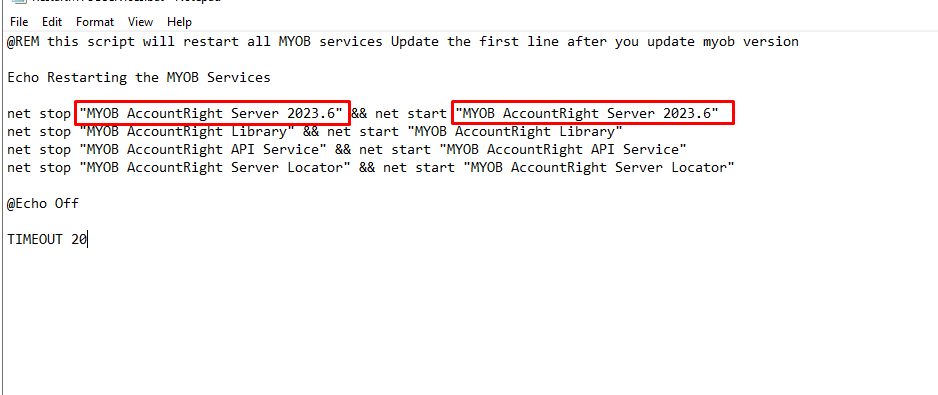
- Run the Bat File
3. If the issues existed for more than twice possible MYOB server is needs to be restarted.
Comments