Trello Usage Policy
Posted at February 26, 2019 03:02 pm. Last updated at May 09, 2019 03:05 pm


Purpose:
In line with company expansion, the purpose of this policy is to outline and clarify guidelines on how to use Trello to organise and manage day to day tasks, long term plans and specialty tasks such as IT, Website and app development tasks.
Policy Details:
All staff members (including management) will be referred to as “team members” in this policy.
For ease of use, team members are more than welcome to have Trello installed on their mobile phone and/or personal device as an additional device, however the company device must always remain logged in on and displayed in their web browser.
At the start of their shift, all team members must ensure they are logged into Trello on a web browser and check for any notifications that may have been received in their absence.
For guidance and procedures on how to create Trello tasks including the use of labels, due dates, checklists, mention’s and inserting attachments please refer to the below links or visit http://help.trello.com/.
https://www.youtube.com/watch?v=xky48zyL9iA
https://www.youtube.com/watch?v=7najSDZcn-U
https://www.youtube.com/watch?v=N_e9HvhtPLE
Team members are to add new tasks (cards) where necessary. When adding a new card, please ensure you add all Members that need to be aware of any notifications on the card. Team members are to comment on cards as much as possible (and in as much detail as possible) explaining tasks and reasons for chosen labels. Within the Card the task name must reference the topic of the List it is on in case it is moved to another list where it may no longer make any sense. New Cards are to be flagged with “New Suggestion” if they require input or review by any other team member.
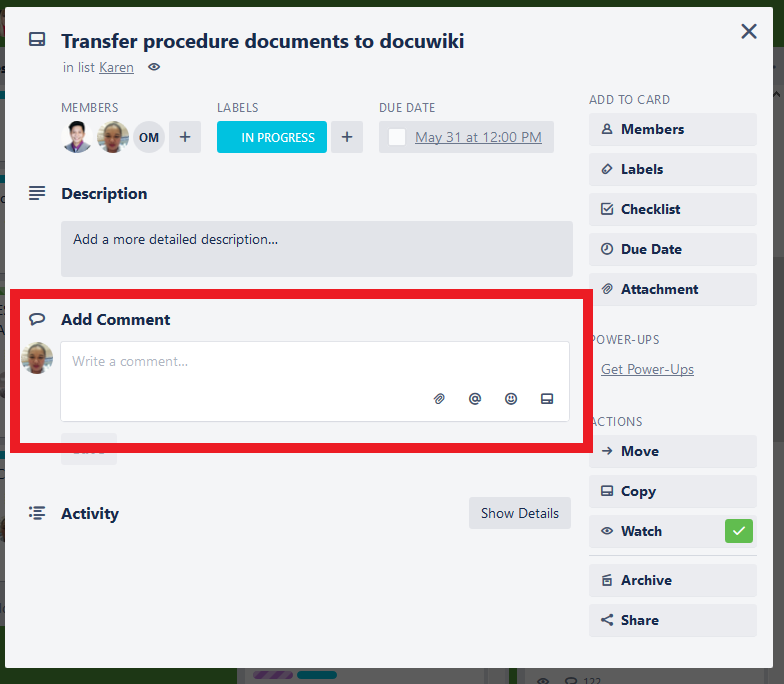
Team members must mention team members where needed within the comments field, to ensure that the team member receives the required notification please use the @ (at) symbol before entering the team members first name. In the web app, their name will come up as you type and you can simply click on it.
Team members must also ensure to check their default diary board throughout the course of the day, but under no circumstance are any tasks to be moved or archived. Should changes be required for default diaries please contact Aaron or Rachelle and outline the changes you wish to make and, should the change be possible, this will be completed for you and you will receive a notification confirming the changes.
Please ensure Labels are kept up to date as cards move through the stages of progress. New Cards should be labelled as “New Suggestion”. Once the idea has been viewed by the other party, they will change the Label to “Under Review”. Once an outcome has been decided upon, the Label will be changed to “Ready to Proceed”, “Issue/Error or on Hold” or “Not to Proceed” accordingly. If the task is urgent or to be completed ASAP, it will be labelled “Urgent/ASAP”. Once a task has been started, it will be labelled “In Progress” and when complete it will be Labelled “Completed”. Please see the table below for full descriptions of Labels.
At the end of your shift team members are to check and update Trello for the following morning. Please ensure labels are current and up to date and archive any tasks that have been labelled “Completed”.
All team members are to be subscribed to their individually named List on the Daily Team To Do List Board.
All team members are to be subscribed to their individually named List on the Long Term Team To Do List Board.
All team members are to be subscribed to their individually named default diary Board.
All team members that are responsible for other boards are to be subscribed to those boards EG: IT Tasks require the IT team to be subscribed to this board, Management require management to be subscribed to this board. Office Improvements require Management in Philippines and Melbourne to be subscribed to this board.
Please note that Aaron, Rachelle and Rich will be part of every board and members of cards on the majority of the boards to ensure that work is progressing along as expected.
When subscribed to a card you will receive notifications for all comments, adding, changing and upcoming due dates on that card, or when the card is moved or archived.
When subscribed to a list or board you will receive the same notifications as listed above but for all cards in a list or a boards, as well as for newly created cards.
Without any other requirement you will get notifications when mentioned in a comment, when you are added to a card, board or team, you are mentioned in a checklist item or when one of your boards is closed.
When adding or sorting cards, the List must be ordered in the following way, with the highest priority or next due tasks in each category to the top and progressively less urgent below:
The “In Progress” tasks
The “Urgent/ASAP” tasks
The “Ready to Proceed” tasks
The “Under Review” tasks
The “New Suggestion” tasks
The “Issue/Error or on hold” tasks
The “Completed” tasks
The “Not to Proceed” tasks
Please see below explanations on the intention of each board and what is required of each team member.
Daily Team To Do List: Team members are to check this board every morning and update the daily tasks as required. Members throughout the day will change and update labels where needed to reflect the status of each task (Please refer to below table of labels). “Completed” and “Not to Proceed” tasks are to be archived at the end of each day. Trello cards (including due dates) are to be updated for the next day.
Team Default Diary: Team members are to check their default diary board several times throughout the day to ensure that all tasks are being performed within the designated time frame.
Long Term Team To Do List: Team members are to refer to this list when you have time to take on a new task. When ready to commence the task please move the task from the Long Term Team To Do list to your daily team to do list and enter the appropriate information such as members that require notifications, due date and appropriate labels.
Other IT Tasks/Management Pages/Public Websites/Office Improvements Suggestion Lists: Suggestion and idea tasks are added by team members for an open discussion in the comments section of the Trello cards. The urgency of the task determines where the task will be placed on the list (With most urgent tasks being placed at the very top of the list and non-urgent tasks at the bottom) and what labels are to be used, IE: Ready to proceed for a task that isn’t urgent but has been approved and Urgent/ASAP for a task that must be completed as soon as possible. Feedback is to be provided where appropriate. Once approved the task will be Labelled “Ready to Proceed” and will be delegated to a team member by their manager. Management may also be added to the card to monitor the progress of the task. The team member will then move the task onto their long term to do list sorted accordingly based on the urgency of the task. Refer back to the Long term team to do list and the daily team to do list for further steps.
Should an idea be labelled “Not to Proceed” the card is to be archived once all parties have acknowledged they are aware, or at the end of each day.
|
Label |
Explanation |
|
|
Any new ideas or suggestions that are created that require input or discussion must have this label attached. |
|
|
This label is to be used when a task is currently being reviewed and assessed by team members before the task is given the ready to proceed or not to proceed. |
|
|
Ready to proceed means the suggestion has been discussed and it is ready to commence work on the task. This label will stay on until the task has been transferred to the delegated team member’s daily to do list and work has commenced. |
|
|
Often tasks will arise that need to take priority. This label is to remain on the task while it remains urgent, please note that this may be until the task is completed. |
|
|
This label lets team members know that a task is currently being worked on by the assigned team member. This label will remain until such time as the card is completed or the task is classified as issue/error or on hold. |
|
|
Once a task has been completed, please use this label. Only at the end of the day should the completed task be archived. |
|
|
Should there be an error or an issue with a task, please use this label. This outlines cannot currently complete the task. Team members MUST provide detailed explanations in the comments section of the task, mentioning anyone you may need assistance or further information from. |
|
|
If it is decided that a task should not proceed, this label should be used. Members should not work on the task any further. Tasks with this label will be archived at the end of each day. |








Please note that the labels stay on the tasks and can be searched for at any time including archived cards.
Recurring items that need to be done on a daily, multi day or weekly basis are NOT to be on the "Daily To Do List", but are to instead be on the "Default Diary".

The "Daily To Do List" is to be used for "Out of the ordinary" or "Project" based tasks that you are currently working on, and updates are to be provided regularly.
When a team member is off, or a role is vacant, their default diary is to be followed with the tasks being split across as many other team members as required to ensure all tasks get done and to the same high standard. The tasks should be assigned to the most suitable person for each task.
Tasks may be delegated to you by them being turned into "Cards" on your "Daily To Do List" and they MUST have a deadline by way of "Due Date" which is to be set within a reasonable amount of time.
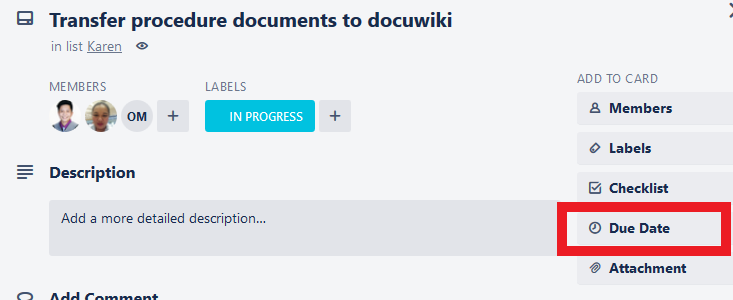
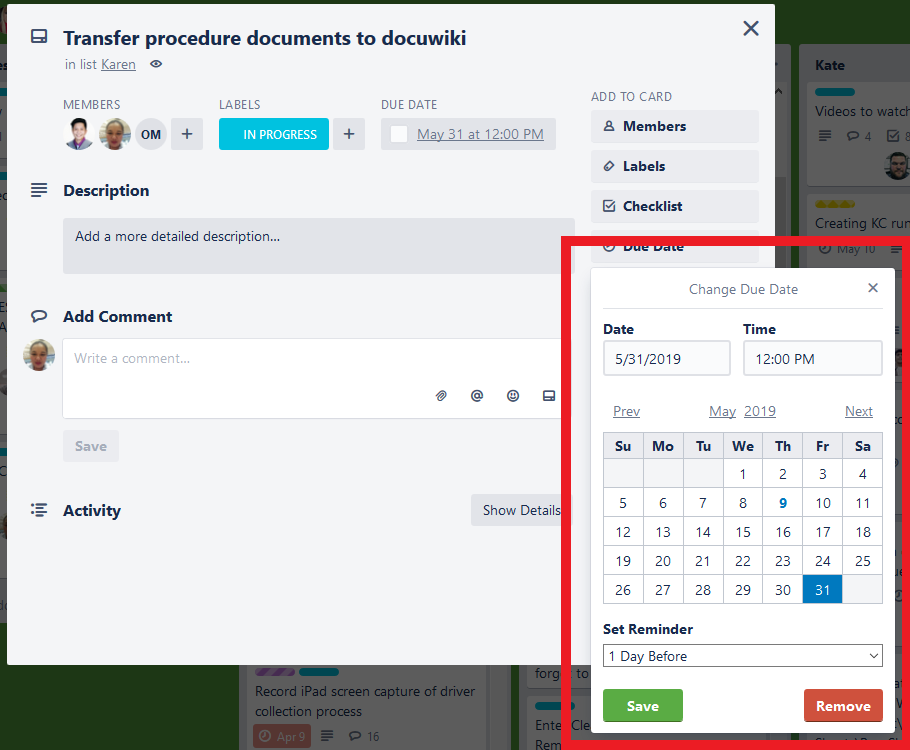
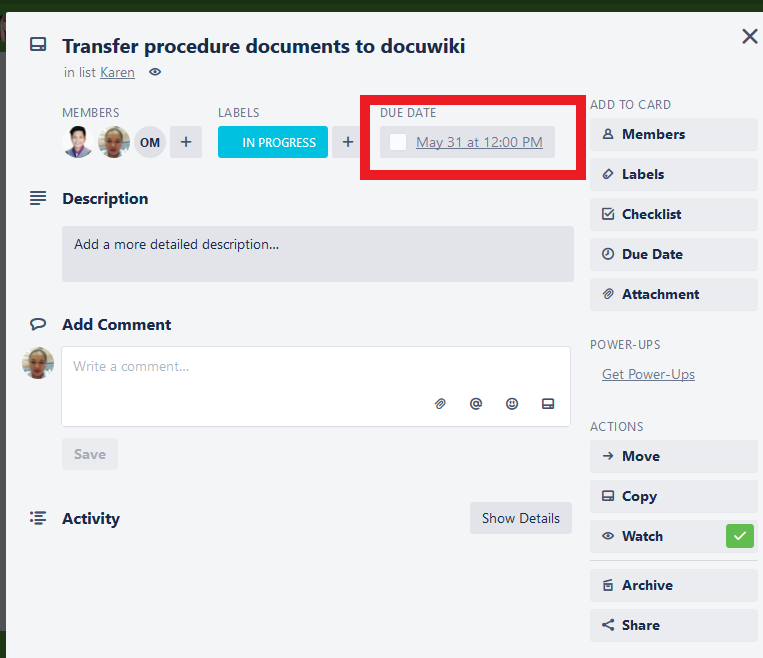
If the task cannot be completed by the Due Date, your progress is to be updated by way of a "@Card blah blah" comment on the card, and the due date is to be extended by a reasonable amount of time to ensure constant and continual progress on every task, and that all parties concerned are kept up to date and know when to expect the next update or completion of the item.
Spot checking will be done by Management from time to time, and anyone found to not be following the above guidelines will receive one of the following:
1) Team members that are on the "Bonus System" (currently Melbourne Only) will receive -1 point for each instance of a task not being completed or updated.
2) Team members that are on the "Team Member of the" system (Currently Philippines Only) will be excluded from the weeks awards.
Where multiple team members are responsible, the team member MOST responsible on that date will receive the nomination.
When a card is completed change the label to "Completed" and make a comment to "@card" with a complete update as to what happened and when, and archive the card. Ensure that NOTHING IS EVER DELETED, only archived.
Comments