How to Create Accounts Payables Sub Directories in Z Drive
Karen Lacsamana
Posted at June 20, 2019 04:06 pm. Last updated at July 02, 2019 05:07 pm

This procedure is to ensure uniformity in the sub directories for the \Accounts\Payables\ folder on the Z drive
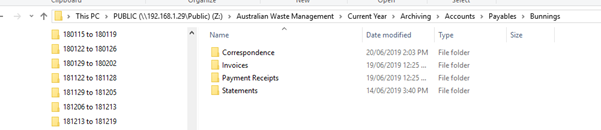
When creating sub directories for the supplier on the Z drive, the following should be included
- Invoices
- Payment Receipts
- Correspondence
- Statements

- Go to Z:\Australian Waste Management\Current Year\Archiving\Accounts\Payables
- Create new folder
- Rename the folder
- Open the Folder and create sub folder for Invoices, Payment Receipts, Correspondence and Statements
Comments